The Shopify Page
that’s Costing you Sales
Fix it in 30 minutes (even if you’re not techy)
A simple Google Sheets toolkit that shows you exactly how to clean up Shopify's hidden /collections/all page — and turn it into a page that actually helps people buy.
Instant access. Opens directly in Google Sheets. No software needed.

4.9/5 reviews

Built for Shopify store owners
Do You Have This Hidden
Shopify page?
Shopify automatically creates this page on every store: /collections/all
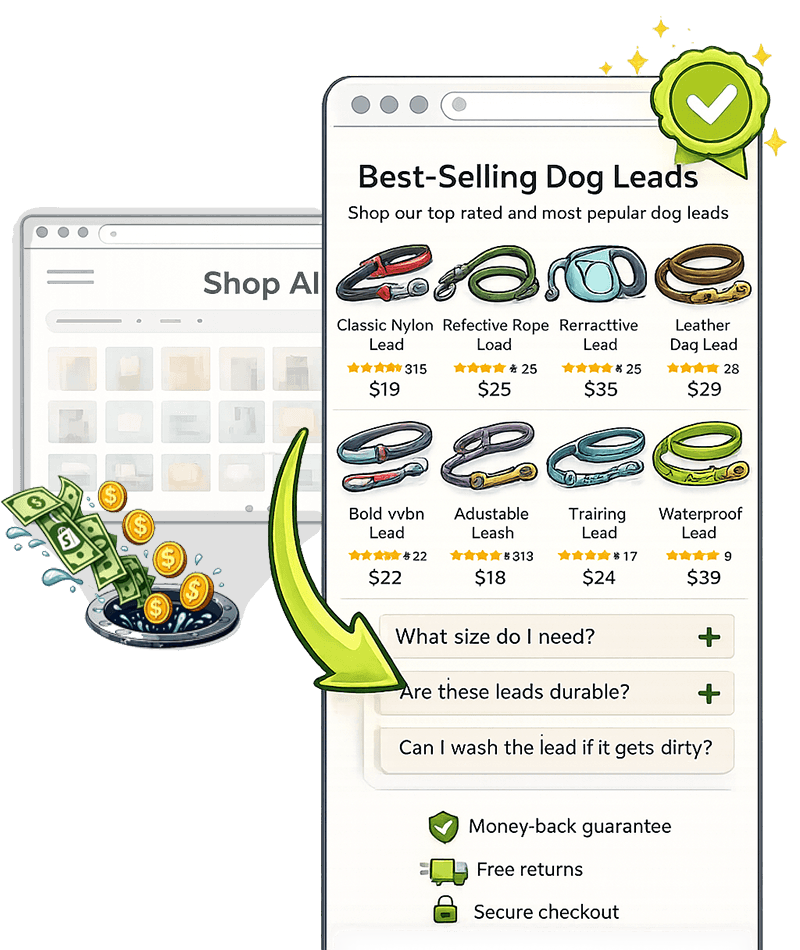
It shows every single product in your store in one long list.
Most store owners end up using this as their “Shop All” page… and don’t realise it’s likely costing them sales.
Type this into your browser:
yourstore.com/collections/all

This page is one of the lowest converting pages on most Shopify stores.
If this page loads and shows all your products in one giant grid, here’s the problem:
Customers don’t know where to start
They scroll briefly… then leave
Most stores see almost no conversions from this page
In other words — you’re sending traffic to a page that loses sales.
Most Shopify store owners don’t even realize this page exists.
This is one of the most common issues I fix on Shopify stores… and it’s surprisingly quick to clean up.
You’re not changing your products.
You’re just making your store easier to shop.

The Shopify Mini Toolkit fix shows you exactly how to:
Take control of Shopify’s hidden /collections/all page
Create a proper Shop page customers can browse
Redirect the default page to your new one
Add simple SEO & AI signals
Organize products so customers find things faster
After this, your shopify store will feel:
✔ easier to browse
✔ clearer for customers
✔ more organised
✔ more like a “real” online store
✔ more trustworthy
And the best part?
You don’t need to be techy to do this.
You just need a clear plan.
That’s exactly what this mini toolkit gives you.
A quick 30-minute fix most stores never realise they need
$9
Shopify Mini Toolkit:
The All Products Page Fix
A simple, step-by-step Google Sheets checklist that shows you exactly what to do.
Includes:
Step-by-step checklist (no guessing)
Takes about 30 minutes to complete
AI prompts for your SEO title & description
Simple product organization tips
BONUS: Collection tiles for browsing
7-Day “Try It” Guarantee
If you complete the workshop and still feel stuck, I’ll jump on a 10-minute call and help you.
Got Questions?

No. This toolkit is designed for non-technical Shopify store owners.
You’ll simply follow the step-by-step checklist inside the Google Sheet. It walks you through exactly where to click in Shopify and what to change.
Most store owners complete the fix in about 30 minutes.
Most store owners finish the entire process in 20–30 minutes.
The checklist walks you through five small fixes step by step, so you’re never guessing what to do next.
Inside the toolkit you’ll learn how to:
• take control of Shopify’s hidden /collections/all page
• create a proper Shop page customers can browse
• redirect the default page to your new page
• add simple SEO signals to help search visibility
• organise products so customers find things faster
These small changes can make your store easier to browse and more professional.
Yes.
The steps work with all Shopify themes because the changes are made inside the Shopify admin, not the theme code.
Shopify automatically creates a default page that lists all products in one grid.
Most store owners don’t realise this page exists, but customers often land on it through links, search engines, or apps.
Because it shows everything in one long list, it’s often confusing and low-converting.
This toolkit shows you how to replace it with a proper shop page.
Yes — it can help.
By fixing this page you improve how search engines understand your products and collections.
The toolkit also includes AI prompts to generate SEO titles and descriptions for your new shop page.
After purchase you’ll receive immediate access to the toolkit.
You simply open the Google Sheet and follow the checklist step by step.
No problem.
If you try the toolkit and it doesn’t help you fix the page, just send an email within 7 days and you’ll receive a full refund.
Yes — you can use the checklist on your own Shopify stores.
The toolkit itself is for personal use only and can’t be resold or redistributed.
No. This is a step-by-step toolkit.
You’ll open the Google Sheet and follow the checklist. Each step shows exactly what to change inside Shopify.
Most store owners complete the fix in about 30 minutes.
"I've audited over 100 Shopify stores. The same problems come up again and again. These toolkits fix them."


“I had no idea this page even existed.”
I checked my store and realised customers were landing on a giant list of products. The toolkit showed me exactly how to fix it and create a proper shop page.
Took about 25 minutes.
Emily T.
Shopify Store Owner
“This made my store feel way more organised.”
My products used to appear in one long list. After following the checklist, customers can actually browse properly now.
Super simple to follow.
Hannah L.
Ecommerce Founder
“Quick win for any Shopify store.”
I followed the Google Sheets checklist and fixed the page in about half an hour. No coding, no apps.
Honestly one of the easiest improvements I've made to my store.
Megan S.
Online Store Owner
“Exactly the kind of training Shopify owners need.”
Clear, practical, and straight to the point. I love that it focuses on one small fix that actually matters.
Highly recommend for new store owners.
Rachel D.
Shopify Business Owner
Grab your FREE Checklist (Quick Start) here!
We HATE spam. Your email address is 100% secure.